Firefox 4 Beta 1 Released

It’s finally here: Mozilla has released the first beta for Firefox 4.

The new iteration of the world’s second most popular web browser, which can be downloaded here, has been hotly anticipated for almost a year. Today however, it transitions from concept to reality, with many more betas to come until its official release at the end of the year.

As we have reported in the past, Firefox 4 is a major upgrade from its predecessors. It not only includes a redesign of the user interface (tabs are now on top except for the Mac version), but a wave of additional features, including enhanced HTML5 support, hardware-accelerated HD video, WebSockets and enhanced add-on support via Jetpack.

There’s a lot more to FirefoxFirefoxFirefox 4, most of which you can see in this feature spotlight the Mozilla team put together to highlight the many upgrades the new browser contains. However, we want to stress that this is an early beta of the browser — it will crash and frustrate you, which is exactly what Mozilla is hoping to catch now before its final release.

Mozilla needs Firefox 4 to be a winner; in recent months, Google Chrome has been stealing browser marketshare at Firefox’s expense. The new version could either reverse the downtrend or accelerate its fall.

Are you going to download the new Firefox 4 beta? What do you think of the new features? Let us know in the comments.


Firefox 4 Beta 1 Released

Five Best DVD Ripping Tools

Whether you want to watch a movie on your iPod or back up your too-easily-scratched DVDs, DVD ripping is a mysterious realm for many. Even those in-the-know find it difficult to keep up with the best tools for the job, especially in the face of increased copy protection.

On Tuesday we asked you to share your favorite DVD ripping tools; today we've sifted through hundreds of comments to bring you the five most popular answers. Hit the jump for a closer look at five of the best and most popular DVD ripping tools, then cast your vote to determine the best ripper of the bunch.

Five Best DVD Ripping Tools

Forty-Three of The Best Free Windows Enhancements That You Should Know About

There is an impressive range of excellent freeware Windows enhancements and tweaks. This posting will present forty three excellent additions to Windows that you will like.

When I first thought of this post, I more or less knew what programs I wanted to list here. The common theme that brought these together was that they were all really cool Windows “enhancements”: i.e. apps that tweak or change the way we work with files, folders, applications, or the system environment itself (or, apps that brings functionality to the Windows environment that could or should have been a built-in option in Windows ;)).

Two more things to say before presenting the list itself; the first is that this list might not include some well known titles because in some cases I shied away from Windows enhancement apps that try to do many things at once in favor of simpler, more straightforward ones. The second is to be aware that many of these have overlapping functions and hotkeys that you wouldn’t necessarily want installed on the same system at the same time (you also dont want to overburden your PC, so install selectively).

Note: this post took a long time to write, so please Stumble or Digg!

Full list here: Forty-Three of The Best Free Windows Enhancements That You Should Know About | freewaregenius.com

PC-Security

Have you just noticed that your computer is running slow lately, using a lot of Internet bandwidth for no reason at all? Read on and we will reveal to you how can we help resolve this issue.

Adware is any software package which automatically plays, displays, or downloads advertisements to a computer after the software is installed on it or while the application is being used.

Spyware is a type of malware that is installed surreptitiously on personal computers to collect information about users, their computer or browsing habits without their consent.

Threats are evolving by the second. It's no longer just about viruses. Spyware, trojans, worms, rootkits, bots and phishing attacks are all on the rise.

Malware writers are constantly reworking their code to evade security defenses. The ESET Threat Center features resources to understand the nature of these evolving threats, their impact on your business, and why proactive protection is so important.

  • The total number of unique phishing reports submitted to APWG in January 2008 was 29,284 an increase of over 3,600 reports from the previous month (Anti-Phishing Working Group)
  • In 2007, 3.6 million adults lost a total of $3.2 billion as a result of phishing attacks in the United States. (Source: Gartner, Inc.)
  • One out of every ten sites on the Web is infected with "drive-by" malware — malware that automatically installs itself on a computer when it visits a site (Google research, 2007)
  • Annual worldwide economic damages from malware exceeded $13 Billion in 2006, which is $10 Billion more than in 1997 (2007 Malware Report, Computer Economics)

That is not all though. The anti-virus software must be updated on a daily basis. That is one of the superior features of anti-virus software as it downloads a list of new bugs and fixes on to your system. This means that, for instance, if a new virus BLAM32 is released today, and you have been updating your virus database daily, you will receive all the necessary protection for your system against BLAM32.

As is often said in security, "Anti-virus software is only as good as its' last update". Merely 73% of individuals update their anti-virus regularly, leaving more and more holes for viruses to pick at.

The most common effect of a virus infection, reported by 70 percent of respondents, was rendering a PC unavailable to the user, the study found. Sixty-nine percent of respondents said that viruses had cost productivity, while 37 percent reported loss of data. ICSA Labs research 2002

Read full article at
Avonsys - PC Security

From Fiji IT experts at Avonsys

20 Indispensable Browser Based Apps | Design Informer

Browser Based Apps

There’s nothing better than a good browser based app. Browser based apps require no downloading and no installation, so you can start using them whenever and wherever you like. What’s more, each one of these apps is accessible from any computer in the world, provided that it’s connected to the internet, so there’s no need to take expensive and heavy hardware with you when you’re out of the office. Some of these apps can be used on your mobile phone too!

There are browser based alternatives to almost every traditional piece of software you frequently use, whether it’s for word processing, image editing, listening to music, screen sharing, storing files and folders, or even making to-do lists. Here, we bring you 20 indispensable web apps, which once you’ve tried, you’ll never want to live without again. Most of the apps explored below are free, so there’s nothing stopping you from giving them a go.

By: Tom Walker: 20 Indispensable Browser Based Apps | Design Informer

30+ Awesome Free and Open Source Audio Applications List | Open Source Technology Blog

Open Source community has great Audio Applications. We had featured 20 Audio Editors. Here is a best of the Audio Applications list that has, Audio Editors, Audio Sequencers, Stream Rippers, CD Rippers and much more. This list is constantly updated and comments, additions are most welcome. Thanks for commenting and helping us to grow the list.

image

Also check out similar posts;

30+ Awesome Free and Open Source Audio Applications List | Open Source Technology Blog:

FreeApp Download, All Must-have Free Apps in One Click | FreeNew


Are you tired of looking around to collect the best and free software for your PC? Are you feeling dizzy to find and install the must-have applications when you buy a new laptop/desktop or restore your system? If so, DO NOT worry. FreeApp can do all the work easily and effectively for you.


All you need to do just:

1. Choose the programs you like best.
2. Get FreeApp installer.
3. Have a cup of coffee and all work will be automatically done in a few minutes.


FreeApp Download, All Must-have Free Apps in One Click | FreeNew: "- Sent using Google Toolbar"

Superior Alternatives to Crappy Windows Software

Application to Avoid: Adobe Reader
Indictment: Bloatware
Superior Alternative(s): FoxIt Reader or Sumatra PDF
Notes: There are much worse offenders on this list than Adobe Reader, which has gotten more performant over the years. Keep in mind that Adobe deals with some PDF's (like ones with editable form fields) better than FoxIt. If you don't want to ditch Adobe Reader entirely, here's how to tweak Adobe 8 for speed.

Application to Avoid: AOL Instant Messenger pidginthumb.png
Indictment: One-trick pony with ads included made by a company that holds its customers hostage. (Speaking of, here's how to cancel your AOL account.)
Superior Alternative(s): Digsby or Pidgin or Miranda or Trillian or Meebo
Notes: The moral of the story is you should avoid anything that comes on six zillion free CDs that swamp your apartment building's mailroom.

Application to Avoid: Browser Toolbars (that you didn't seek out yourself)
Indictment: Notorious for hijacking your browser, phoning home with your online activity, taking up precious real estate, and not offering any features you actually want.
Superior Alternative(s): Your browser's built-in search box and a few good bookmarklets
Notes: Don't get us wrong: Not all toolbars are bad, but do beware when they get tacked onto the end of a totally unrelated software installation and you have to opt OUT of them.

Application to Avoid: Internet Explorer (6 and 7)
Indictment: Lacks features any self-respecting modern web browser had two versions ago
Superior Alternative(s): Firefox
Notes: Because IE gloms onto the innards of your operating system so inextricably, you can't truly uninstall it. Just set your system's default browser to Firefox to avoid launching IE ever.

Application to Avoid: iTunes
Indictment: Too controlling, gleefully enforces DRM, can't monitor folders for new music
Superior Alternative(s): foobar200 (more on foobar2000), Songbird, or WinAmp
Notes: We—ok, I—actually like and use iTunes, ever since that time Steve Jobs waved that iPhone over my forehead and chanted. These recommendations only for those with particularly sensitive digital music sensibilities.

Application to Avoid: Java Runtime Environment
Indictment: You ugly and yo' Mama dresses you funny
Superior Alternative(s): None.
Notes: If you want to run a Java app, without the runtime you're SOL. Java, we love the idea of you. Just not the coffee cup staring at us from the system tray.

Application to Avoid: Limewire
Indictment: Where do we start? Haven't launched Limewire since our college days, and don't plan to ever look back
Superior Alternative(s): Frostwire
Notes: Bonus: Frostwire does BitTorrent, too.

Application to Avoid: MSN Messenger
Indictment: Little ugly non-faces with a red X over them plant themselves in your system tray with no obvious way to uninstall or quit it
Superior Alternative(s): Digsby or Pidgin or Miranda or Trillian or Meebo
Notes: Uninstall MSN Messenger by going to the "Add/Remove Windows Components" area in Control Panel's "Add/Remove Programs" area.

Application to Avoid: Nero Suite
Indictment: Costly
Superior Alternative(s): CDBurnerXP
Notes: The free CDBurnerXP may not do everything Nero does, but for the price it does a whole lot.

Application to Avoid: McAfee/Norton/Symantec Anti-Virus
Indictment: Naggy subscription costs after the free trial on your new PC runs out
Superior Alternative(s): AVG or Avast
Notes: See why many readers have ditched their AV software.

Application to Avoid: QuickTime
Indictment: Plants itself in your startup and system tray
Superior Alternative(s): QuickTime Alternative
Notes: While QuickTime doesn't annoy us THAT much, it still annoys us a little—especially since it comes with Apple's Software Update. (See Safari's Honorable Mention, below.)

Application to Avoid: RealPlayer
Indictment: We're still so traumatized about RealPlayer's repeated takeover of our PC back in 2004 we're seeing a special doctor that's killing that part of our memory
Superior Alternative(s): Real Alternative

vlcthumb.pngApplication to Avoid: Windows Media Player
Indictment: WTF interface, chokes on clips in common formats
Superior Alternative(s): VLC

Application to Avoid: WinZip
Indictment: Cost
Superior Alternative(s): 7-Zip or ALZip

Honorable mention: While Apple's Safari web browser for Windows itself is not crappy, Apple's Software Update trying to push it on you completely sucks. Here's how to opt out of installing Safari and stop the nag.
What crappy apps or better alternatives did we miss? Did we wrongly accuse one of your favorites? Let us know in the comments.
Gina Trapani, the editor of Lifehacker, still hasn't forgiven RealPlayer. Her weekly feature, Geek to Live, appears every Monday on Lifehacker. Subscribe to the Geek to Live feed to get new installments in your newsreader.

Superior Alternatives to Crappy Windows Software

ImgBurn

ImgBurn is a lightweight CD / DVD / HD DVD / Blu-ray burning application that everyone should have in their toolkit!

It has several 'Modes', each one for performing a different task:

  • Read - Read a disc to an image file
  • Build - Create an image file from files on your computer or network - or you can write the files directly to a disc
  • Write - Write an image file to a disc
  • Verify - Check a disc is 100% readable. Optionally, you can also have ImgBurn compare it against a given image file to ensure the actual data is correct
  • Discovery - Put your drive / media to the test! Used in combination with DVDInfoPro, you can check the quality of the burns your drive is producing

The Official ImgBurn Website

CDBurnerXP

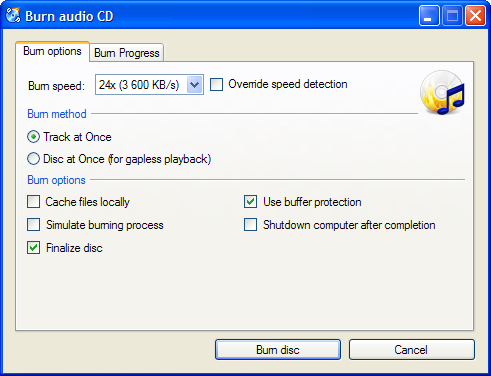
CDBurnerXP is a free application to burn CDs and DVDs, including Blu-Ray and HD-DVDs. It also includes the feature to burn and create ISOs, as well as a multilanguage interface. Everyone, even companies, can use it for free. It does not include adware or similar malicious components.

Screenshot

Key Features

  • burn all kinds of discs
  • audio-CDs with or without gaps between tracks
  • burn and create ISO files
  • data verification after burning process
  • create bootable discs
  • multi-language interface
  • bin/nrg → ISO converter, simple cover printing and much more!
  • Operating Systems: Windows 2000/XP/2003 Server/Vista/2008/Win7 (x86 / x64)

Download now!

Further info: Compatible drives list - Detailed list of features - Online helpfile


CDBurnerXP: Introduction and News