LyX | LyX – The Document Processor

Download
LyX is a document processor that encourages an approach to writing based on the structure of your documents (WYSIWYM), and not simply their appearance (WYSIWYG). 
LyX combines the power and flexibility of TeX/LaTeX with the ease of use of a graphical interface. This results in world-class support for creation of mathematical content (via a fully integrated equation editor) and structured documents like academic articles, theses, and books. In addition, staples of scientific authoring such as reference list and index creation come standard. But you can also use LyX to create a letter or a novel or a theatre play or film script. A broad array of ready, well-designed document layouts are built in. 
LyX is for people who want their writing to look great, right out of the box. No more endless tinkering with formatting details, “finger painting” font attributes or futzing around with page boundaries. You just write. On screen, LyX looks like any word processor; its printed output — or richly cross-referenced PDF, just as readily produced — looks like nothing else. 
LyX is released under a Free Software / Open Source license, runs on Linux/Unix, Windows, and Mac OS X, and is available in several languages.

LyX | LyX – The Document Processor

10 Intermediate Ways To Speed Up Windows | Connected Internet

Given how successful my Simple Guide to Tweaking Windows XP has been I’ve decided to post some more complex tweaks. The effectiveness of each of these tweaks will vary from machine to machine.
I’ve tried to focus on tweaks that I’m confident can be made on any XP machine regardless of the individual setup. Please do not make any of these changes if you are not sure what you are doing, and remember to make backups first and good luck!

1. Disable Unnecessary Services
Because Windows XP has to be all things to all people it has many services running that take up system resources that you will never need. Below is a list of services that can be disabled on most machines:

  • Alerter
  • Clipbook
  • Computer Browser
  • Distributed Link Tracking Client
  • Fast User Switching
  • Help and Support - (If you use Windows Help and Support leave this enabled)
  • Human Interface Access Devices
  • Indexing Service
  • IPSEC Services
  • Messenger
  • Netmeeting Remote Desktop Sharing (disabled for extra security)
  • Portable Media Serial Number
  • Remote Desktop Help Session Manager (disabled for extra security)
  • Remote Procedure Call Locator
  • Remote Registry (disabled for extra security)
  • Remote Registry Service
  • Secondary Logon
  • Routing & Remote Access (disabled for extra security)
  • Server
  • SSDP Discovery Service - (Unplug n’ Pray will disable this)
  • Telnet
  • TCP/IP NetBIOS Helper
  • Upload Manager
  • Universal Plug and Play Device Host
  • Windows Time
  • Wireless Zero Configuration (Do not disable if you use a wireless network)
  • Workstation
To disable these services:
  1. Go to Start and then Run and type “services.msc”
  2. Doubleclick on the service you want to change
  3. Change the startup type to ‘Disable”
2. Turn Off System Restore
System Restore can be a useful if your computer is having problems, however storing all the restore points can literally take up Gigabytes of space on your hard drive. To turn off System Restore:
1. Open Control Panel
2. Click on Performance and Maintenance
3. Click on System
4. Click on the System Restore tab
5. Tick ‘Turn off System Restore on All Drives’
6. Click ‘Ok’


Read full article here: 10 Intermediate Ways To Speed Up Windows | Connected Internet

PC Hacks: How to avoid Windows XP Re-activation

From : PC Hacks

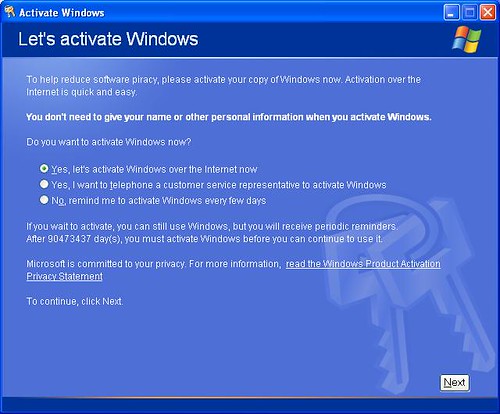
The time may come that you'll need to reinstall your Windows XP. It could happen. Maybe you'll add a new motherboard or hard drive. Maybe you'll get constant errors and problems that just won't go away. Or perhaps you're a neat freak who wants to rid yourself of clutter and start fresh with a clean operating system. If you do reinstall Windows XP, then you'll need to re-activate it too; that is, unless you keep this tip handy.


See, the first time you activated XP it created a file called "wpa.dbl" that lives in the WINDOWS\system32 folder. By creating a backup of this file on disk, you can simply put it back into the folder after reinstalling XP and avoid the whole re-activation hassle. Here's how...

  • Go to My Computer then select your hard drive (usually drive C). Go to the WINDOWS\system32 folder and scroll way down until you find the wpa.dbl file.
  • Right-click and choose "Send To" then either floppy disk (make sure you have a disk in), flash disk or CD-R/RW.

Now, when you reinstall Windows XP you'll come to the activation screen, decline to activate and let the install finish.
Restart your computer in Safe Mode (keep hitting F8 at start-up then when the Advanced Boot Options menu appears arrow down to Safe Mode).

Find your way back to the WINDOWS\system32 folder. It's a good idea to rename the wpa.dbl file you're replacing just in case you run into problems, so call it something like "wpa.nothing".

Get the backup disk and copy the old wpa.dbl file back to the WINDOWS\system32 folder and reboot.

There you go, your XP is up and running again.

Note: Your wpa.dbl file might NOT WORK on another computer.


PC Hacks: How to avoid Windows XP Re-activation

8 hacks to make Firefox ridiculously fast | PCAnswers

Firefox has been outperforming IE in every department for years, and version 3 is speedier than ever.

But tweak the right settings and you could make it faster still, more than doubling your speed in some situations, all for about five minutes work and for the cost of precisely nothing at all. Here's what you need to do.

1. Enable pipelining

Browsers are normally very polite, sending a request to a server then waiting for a response before continuing. Pipelining is a more aggressive technique that lets them send multiple requests before any responses are received, often reducing page download times. To enable it, type about:config in the address bar, double-click network.http.pipelining and network.http.proxy.pipelining so their values are set to true, then double-click network.http.pipelining.maxrequests and set this to 8.

Keep in mind that some servers don't support pipelining, though, and if you regularly visit a lot of these then the tweak can actually reduce performance. Set network.http.pipelining and network.http.proxy.pipelining to false again if you have any problems.

2. Render quickly

Large, complex web pages can take a while to download. Firefox doesn't want to keep you waiting, so by default will display what it's received so far every 0.12 seconds (the "content notify interval"). While this helps the browser feel snappy, frequent redraws increase the total page load time, so a longer content notify interval will improve performance.

Type about:config and press [Enter], then right-click (Apple users ctrl-click) somewhere in the window and select New > Integer. Type content.notify.interval as your preference name, click OK, enter 500000 (that's five hundred thousand, not fifty thousand) and click OK again.

Right-click again in the window and select New > Boolean. This time create a value called content.notify.ontimer and set it to True to finish the job.

3. Faster loading

If you haven't moved your mouse or touched the keyboard for 0.75 seconds (the content switch threshold) then Firefox enters a low frequency interrupt mode, which means its interface becomes less responsive but your page loads more quickly. Reducing the content switch threshold can improve performance, then, and it only takes a moment.

Type about:config and press [Enter], right-click in the window and select New > Integer. Type content.switch.threshold, click OK, enter 250000 (a quarter of a second) and click OK to finish.

4. No interruptions

You can take the last step even further by telling Firefox to ignore user interface events altogether until the current page has been downloaded. This is a little drastic as Firefox could remain unresponsive for quite some time, but try this and see how it works for you.

Type about:config, press [Enter], right-click in the window and select New > Boolean. Type content.interrupt.parsing, click OK, set the value to False and click OK.

5. Block Flash

Intrusive Flash animations are everywhere, popping up over the content you actually want to read and slowing down your browsing. Fortunately there's a very easy solution. Install the Flashblock extension (flashblock.mozdev.org) and it'll block all Flash applets from loading, so web pages will display much more quickly. And if you discover some Flash content that isn't entirely useless, just click its placeholder to download and view the applet as normal.

6. Increase the cache size

As you browse the web so Firefox stores site images and scripts in a local memory cache, where they can be speedily retrieved if you revisit the same page. If you have plenty of RAM (2 GB of more), leave Firefox running all the time and regularly return to pages then you can improve performance by increasing this cache size. Type about:config and press [Enter], then right-click anywhere in the window and select New > Integer. Type browser.cache.memory.capacity, click OK, enter 65536 and click OK, then restart your browser to get the new, larger cache.

7. Enable TraceMonkey

TraceMonkey is a new Firefox feature that converts slow Javascript into super-speedy x86 code, and so lets it run some functions anything up to 20 times faster than the current version. It's still buggy so isn't available in the regular Firefox download yet, but if you're willing to risk the odd crash or two then there's an easy way to try it out.

Install the latest nightly build (ftp://ftp.mozilla.org/pub/firefox/nightly/latest-trunk/), launch it, type about:config in the address bar and press Enter. Type JIT in the filter box, then double-click javascript.options.jit.chrome and javascript.options.jit.content to change their values to true, and that's it - you're running the fastest Firefox Javascript engine ever.

8. Compress data

If you've a slow internet connection then it may feel like you'll never get Firefox to perform properly, but that's not necessarily true. Install toonel.net (toonel.net) and this clever Java applet will re-route your web traffic through its own server, compressing it at the same time, so there's much less to download. And it can even compress JPEGs by allowing you to reduce their quality. This all helps to cut your data transfer, useful if you're on a limited 1 GB-per-month account, and can at best double your browsing performance.

Originally posted: In Depth: 8 hacks to make Firefox ridiculously fast | PCAnswers

Try Ubuntu Linux on your Windows machine

Now you will have a chance to experience Linux on your Windows machine. This is accomplish by using Wubi installer.

According to How to Forge (who already tried testing this software), Wubi is an Ubuntu installer for Windows that lets you install and uninstall Ubuntu from a Windows desktop. Wubi adds an entry to the Windows boot menu which allows you to run Linux. Ubuntu is installed within a file in the Windows file system (a loopmounted partition), this file is seen by Ubuntu as a real hard disk.

That way the hard drive does not have to be repartitioned before the Ubuntu installation. The resulting Ubuntu installation is a "real" Linux system, not just a virtual machine.This is really a good news to the newbies out there who wants to be familiarize to Linux environment without compromising their Windows partitions. If you don't like it, you can uninstall it anyway and revert it back to your old Windows OS.

Take note, installing this software does not guaranty you of an instant success installation, you will have to be fully responsible of your undertakings. If your a person who wants to learn and play around to something new this is for you.

Wubi is an officially supported Ubuntu installer for Windows users that can bring you to the Linux world with a single click. Wubi allows you to install and uninstall Ubuntu as any other Windows application, in a simple and safe way. Are you curious about Linux and Ubuntu? Trying them out has never been easier!

Wubi  is Simple

No need to burn a CD. Just run the installer, enter a password for the new account, and click "Install", go grab a coffee, and when you are back, Ubuntu will be ready for you.

Wubi is Safe

You keep Windows as it is, Wubi only adds an extra option to boot into Ubuntu. Wubi does not require you to modify the partitions of your PC, or to use a different bootloader, and does not install special drivers. It works just like any other application. Wubi is spyware and malware free, and being open source, anyone can verify that.

Wubi is Discrete

Wubi keeps most of the files in one folder, and if you do not like it, you can simply uninstall it as any other application.
Download Now

Wubi is Free

Wubi and Ubuntu cost absolutely nothing (free as in beer), but yet provide a state of the art, fully functional, operating system that does not require any activation and does not impose any restriction on its use (free as in freedom).

IObit SmartDefrag


What’s the primary cause of slow/unstable PC performance? It’s disk fragmentation. IObit SmartDefrag helps defragment your hard drive more efficiently than any other product on the market –– free or not.

Features of this powerful, award-winning defragmenter program include: An "Install It and Forget It" feature that works automatically and quietly in the background on your coWhat’s the primary cause of slow/unstable PC performance? It’s disk fragmentation. IObit SmartDefrag helps defragment your hard drive more efficiently than any other product on the market –– free or not.

Features of this powerful, award-winning defragmenter program include:
  • An "Install It and Forget It" feature that works automatically and quietly in the background on your computer.
  • The ability to constantly keep your hard drive safe, error-free and running at its top speed and optimum performance.
  • Eliminates slow downs, freeze-ups and crashes.
  • IObit SmartDegrag is 100% FREE award-winning software that’s for personal, home and small business.
  • 100% safe from any spyware, adware and virus. .
  • Designed for Windows Vista, XP, and 2000.
  • Distribute it freely, copy it, sell it or include it as part of a package – as long as it is left completely intact and unchanged.
IObit SmartDefrag 

Torrent Swapper

Torrent Swapper is an open sourced sociable peer to peer file-sharing client based on the Bittorrent protocol that is ideal for high-speed distribution of large files that has a basic understanding of human friendships, of user tastes in content, and of Internet connectivity between users. Torrent Swapper supports simultaneous downloads, download queue, selected downloads in torrent package, fast-resume, disk cache, speed limits, port mapping, proxy, ip-filter, etc.

Social Benfits

The main idea of P2P technology is that users pool resources together and create a social service. Because users donate resources, there is no cost to the content distribution infrastructure. In the UK, the BBC a file-sharing system for TV program downloads. The largest encyclopedia on earth, Wikipedia was solely created by volunteers without authoritative, central editors. The Skype VOIP telephony software uses P2P to reduce the cost of Internet telephony and became a market leader in just a few months. P2P is now the "killer app" of the Internet.

Unfortunately, P2P is mainly used for the illegal spreading of intellectual property. We believe that P2P is the future of content distribution and will mature from the current "wild west" into a respectable business solution.

For example, Pual Geller and Lurence Lessig are arguing for P2P as means for spreading specialized content to a small group of audience, such as video recordings of local concerts, soccer matches, and city council meetings that with advent of P2P have suddenly became feasible due to the low cost of using P2P over the Internet.

With Torrent Swapper, we are creating software for sharing large files that has a basic understanding of human friendships, of user tastes in content, and of Internet connectivity between users.

Features:

Torrent Swapper is an improved client for the Bittorrent peer-to-peer file distribution solution that is both resource friendly Yet Feature Filled. Some of Torrent Swapper features include;
  • Amazon-like recommendations to get interesting files
  • Doubling the download speed by using the upload capacity of friends
  • Real-time P2P file sharing with P2P video streaming
  • Showing the locations of seeders / leechers of the same content with city-level accuracy on a world map
  • Multiple downloads in a single window
  • Queueing system with priority
  • Supporing pause, stop, resume, queue, remove operations
  • Supporting global setting such as upload and download limiting
  • Supporting local setting for each torrent as well
  • And much more...
 Torrent Swapper

Auslogics Disk Defrag

Disk fragmentation leads to system slowdowns, PC crashes, slow startup and shutdown and sometimes to system failures. Auslogics Disk Defrag is designed for fast optimization of today's modern hard disks.


What is fragmentation?

Fragmentation is caused by creating and deleting files and folders, installing new software, and downloading files from the Internet. Computers do not necessarily save an entire file or folder in a single space on a disk; they're saved in the first available space. After a large portion of a disk has been used, most of the subsequent files and folders are saved in pieces across the volume.

When you delete files or folders, the empty spaces left behind are filled in randomly as you store new ones. This is how fragmentation occurs. The more fragmented the volume is, the slower the computer's file input and output performance will be.

What is defragmentation?

Defragmentation is the process of rewriting non-contiguous parts of a file to contiguous sectors on a disk for the purpose of increasing data access and retrieval speeds. Because FAT and NTFS disks can deteriorate and become badly fragmented over time, defragmentation is vital for optimal system performance.

Why Defragment Disks?


Hard disks are by far the slowest component in your computer. CPU and memory work much faster than hard disks because they do not have moving parts. Therefore fragmented disks often become a bottleneck of the system performance.

Besides causing slowdowns, fragmentation makes the hard drive disk heads move frequently when reading files which leads to freeze-ups and system crashes. It is important to keep your disks defragmented and optimized as much as possible.

Auslogics Disk Defrag is a compact, manual defragmentation tool that supports FAT 16, FAT 32, and NTFS (with compressed and encrypted files). For the individual user, Disk Defrag is more than adequate for the job of maintaining high-level disk performance.

MojoPac : Turn your portable device into a portable PC

MojoPac is a technology that transforms your iPod or USB Hard Drive or Flash drive into a portable and private PC. Just install MojoPac on any USB 2.0 compliant storage device, upload your applications and files, modify your user settings and environment preferences, and take it with you everywhere.

Every time you plug your MojoPac-enabled device into any Windows XP PC , MojoPac automatically launches your environment on the host PC. Your communications, music, games, applications, and files are all local and accessible. And when you unplug the MojoPac device, no trace is left behind – your information is not cached on the host PC.
Note: The current version of MojoPac requires administrative privileges on the host PC.

License type: Freeware
Operating Systems: Windows XP/Vista
File size: 7.5 MB
Developer: RingCube Technologies, Inc.


For the instructions on how to use it, click here.

Naomi : Protect children from all kinds of inappropriate web content.

Naomi is an advanced internet filtering program, easy to use and totally free, intended for families, and kids in particular.

Naomi is able to constantly monitor all internet connections, protecting children from inappropriate online material - such as obscene or violent contents; pornography, pedophilia and erotism in the form of images or texts, sites that popularize drugs, gambling games, terrorism, hate propaganda, occultism, sects, blasphemy, etc.

Naomi does not rely on a simple list of banned sites; instead, it examines in real-time all the data being transmitted and received through any internet application - such as web browers, chat programs, news readers, etc.
The filtering technology employed in Naomi features:
  • Heuristic analysis capable of recognizing new material automatically.
  • Semantic analysis of web pages contents and analysis of their addresses and links.
  • Recognizes all the major languages (10+).
  • Recognizes ICRA labeling system.
  • Monitoring is not limited to web sites, but covers the whole local internet traffic.
  • Works with all service providers and software applications, and does not alter settings.
  • Allows blocking of file-sharing applications.
  • Password-protected (the password is chosen during the installation).
  • Easy to use: does not require configuration.
  • Can be used on slow connections (it does not perform any download in background).
License type: Freeware
Operating Systems: Windows NT/2000/XP/Vista (XP 64-bit currently not supported; not tested with Windows 98/ME)
File size: 1.4 MB
Developer: Radiant Morning

Note: You need to set a password to access the controls. If you forget that password, it is very difficult to remove the program.