Open Source community has great Audio Applications. We had featured 20 Audio Editors. Here is a best of the Audio Applications list that has, Audio Editors, Audio Sequencers, Stream Rippers, CD Rippers and much more. This list is constantly updated and comments, additions are most welcome. Thanks for commenting and helping us to grow the list.
Are you tired of looking around to collect the best and free software for your PC? Are you feeling dizzy to find and install the must-have applications when you buy a new laptop/desktop or restore your system? If so, DO NOT worry. FreeApp can do all the work easily and effectively for you.
All you need to do just:
1. Choose the programs you like best. 2. Get FreeApp installer. 3. Have a cup of coffee and all work will be automatically done in a few minutes.
Application to Avoid: Adobe Reader Indictment: Bloatware Superior Alternative(s):FoxIt Reader or Sumatra PDF Notes: There are much worse offenders on this list than Adobe Reader, which has gotten more performant over the years. Keep in mind that Adobe deals with some PDF's (like ones with editable form fields) better than FoxIt. If you don't want to ditch Adobe Reader entirely, here's how to tweak Adobe 8 for speed.
Application to Avoid: AOL Instant Messenger Indictment: One-trick pony with ads included made by a company that holds its customers hostage. (Speaking of, here's how to cancel your AOL account.) Superior Alternative(s):Digsby or Pidgin or Miranda or Trillian or Meebo Notes: The moral of the story is you should avoid anything that comes on six zillion free CDs that swamp your apartment building's mailroom.
Application to Avoid: Browser Toolbars (that you didn't seek out yourself) Indictment: Notorious for hijacking your browser, phoning home with your online activity, taking up precious real estate, and not offering any features you actually want. Superior Alternative(s): Your browser's built-in search box and a few good bookmarklets Notes: Don't get us wrong: Not all toolbars are bad, but do beware when they get tacked onto the end of a totally unrelated software installation and you have to opt OUT of them.
Application to Avoid: Internet Explorer (6 and 7) Indictment: Lacks features any self-respecting modern web browser had two versions ago Superior Alternative(s):Firefox Notes: Because IE gloms onto the innards of your operating system so inextricably, you can't truly uninstall it. Just set your system's default browser to Firefox to avoid launching IE ever.
Application to Avoid: iTunes Indictment: Too controlling, gleefully enforces DRM, can't monitor folders for new music Superior Alternative(s):foobar200 (more on foobar2000), Songbird, or WinAmp Notes: We—ok, I—actually like and use iTunes, ever since that time Steve Jobs waved that iPhone over my forehead and chanted. These recommendations only for those with particularly sensitive digital music sensibilities.
Application to Avoid: Java Runtime Environment Indictment: You ugly and yo' Mama dresses you funny Superior Alternative(s): None. Notes: If you want to run a Java app, without the runtime you're SOL. Java, we love the idea of you. Just not the coffee cup staring at us from the system tray.
Application to Avoid: Limewire Indictment: Where do we start? Haven't launched Limewire since our college days, and don't plan to ever look back Superior Alternative(s):Frostwire Notes: Bonus: Frostwire does BitTorrent, too.
Application to Avoid: MSN Messenger Indictment: Little ugly non-faces with a red X over them plant themselves in your system tray with no obvious way to uninstall or quit it Superior Alternative(s):Digsby or Pidgin or Miranda or Trillian or Meebo Notes: Uninstall MSN Messenger by going to the "Add/Remove Windows Components" area in Control Panel's "Add/Remove Programs" area.
Application to Avoid: Nero Suite Indictment: Costly Superior Alternative(s):CDBurnerXP Notes: The free CDBurnerXP may not do everything Nero does, but for the price it does a whole lot.
Application to Avoid: McAfee/Norton/Symantec Anti-Virus Indictment: Naggy subscription costs after the free trial on your new PC runs out Superior Alternative(s):AVG or Avast Notes: See why many readers have ditched their AV software.
Application to Avoid: QuickTime Indictment: Plants itself in your startup and system tray Superior Alternative(s):QuickTime Alternative Notes: While QuickTime doesn't annoy us THAT much, it still annoys us a little—especially since it comes with Apple's Software Update. (See Safari's Honorable Mention, below.)
Application to Avoid: RealPlayer Indictment: We're still so traumatized about RealPlayer's repeated takeover of our PC back in 2004 we're seeing a special doctor that's killing that part of our memory Superior Alternative(s):Real Alternative
Application to Avoid: Windows Media Player Indictment: WTF interface, chokes on clips in common formats Superior Alternative(s):VLC
Application to Avoid: WinZip Indictment: Cost Superior Alternative(s):7-Zip or ALZip
Honorable mention: While Apple's Safari web browser for Windows itself is not crappy, Apple's Software Update trying to push it on you completely sucks. Here's how to opt out of installing Safari and stop the nag.
What crappy apps or better alternatives did we miss? Did we wrongly accuse one of your favorites? Let us know in the comments. Gina Trapani, the editor of Lifehacker, still hasn't forgiven RealPlayer. Her weekly feature, Geek to Live, appears every Monday on Lifehacker. Subscribe to the Geek to Live feed to get new installments in your newsreader.
Verify - Check a disc is 100% readable. Optionally, you can also have ImgBurn compare it against a given image file to ensure the actual data is correct
Discovery - Put your drive / media to the test! Used in combination with DVDInfoPro, you can check the quality of the burns your drive is producing
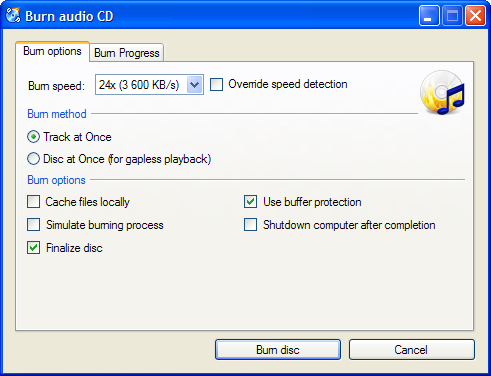
CDBurnerXP is a free application to burn CDs and DVDs, including Blu-Ray and HD-DVDs. It also includes the feature to burn and create ISOs, as well as a multilanguage interface. Everyone, even companies, can use it for free. It does not include adware or similar malicious components.
Key Features
burn all kinds of discs
audio-CDs with or without gaps between tracks
burn and create ISO files
data verification after burning process
create bootable discs
multi-language interface
bin/nrg → ISO converter, simple cover printing and much more!
Operating Systems: Windows 2000/XP/2003 Server/Vista/2008/Win7 (x86 / x64)
Mozilla web browsers (Firefox and Flock) are my absolute favourites, so, like many of you, I’ve been waiting for Firefox 3.5 to come live. Now that we all had a chance to use Firefox 3.5 for some time, let me share with you which of it’s new and improved features I like best.
Microsoft has over 150 FREE Windows XP, Windows Vista & Office Programs available for download -- finding them all is extremely difficult . . . until now.
Firefox has just turned five, and it’s doubtful anybody outside of Redmond begrudges Mozilla’s celebrations. The open-source browser now accounts for 25% of the global market, according to figures from Net Applications, and has brought a radical rethink in what we expect from a browser.
However, as Mozilla blows out the birthday cake candles, it might also be reflecting on the curse of getting what you wish for. Its success has forced rivals to raise their game, and the past two years have seen Microsoft, Apple and Opera close the features gap significantly.
“They’ve been forced to improve their browsers, and they have resources at their disposal that Mozilla doesn’t,” said Rob Enderle, principal analyst at the Enderle Group. “It was a different ball game when it was Mozilla against Microsoft, everybody was on its side. Now that there are alternatives, it’s going to be harder.”
I’m a big fan of FREE STUFF, so it should be no surprise that I gravitate towards free software. Sure much of it is junkie, but there are some realy diamonds out there that haven’t hit the mainstream yet. Here’s my favorite 10.
Ever find yourself away from home and wishing you could e-mail yourself something? Or maybe you have a mother-in-law who lives 4 states away and is always having computer problems, and instead of loading up the kids in the family trickster for a marriage-trying trip, you could just log in to her computer remotely¦.without her needing to do anything? This is where Logmein comes in. There are lots of products out there that will do this, but very few will do all these things as well as Logmein ds for free.
Microsoft has a knack of not promoting some of the apps that they offer. Mesh is one of those apps. Another computer sharing application, but Mesh displays all the computers in a 3-D rotating ring and also offers a Web Desktop that syncs with all the computers on your Mesh. There is a promise of making Mesh work on Macs, but I haven’t yet seen it work. Mesh is super responsive and I really like how it feels while using it! The interface is clean and intuitive and I think the reason Microsoft ds not promote it is too many people would use it!
Yet another non-marketed gem from Microsoft. Photostory 3 is one of the easiest ways to create a very professional photo slideshow complete with background music (MP3 or you can create your own with the built-in music generator) and narration. The application is super easy to use and the results are far superior that some softwares that I’ve paid to use. The only downfall is that it dsn’t have a built-in burning application to burn the slideshow to CD or DVD.
Like many people, I don’t get to stay at home with my vault of audio and video goodness at my disposal. This is where Orb steps in. Orb allows a simple way to put your audio, photos and video online and accessible to your little antsy fingertips. One of my favorite features is the ability to stream webcams live on the internet, so if I miss my dog, I can log in and see and hear him. Very slick and very easy to set up!
Wouldn’t it be nice to have a storage cloud of your own to store items and further more wouldn’t it be nice if it synced with your other computers? That’s Dropbox. I use it to store keepers� or documents and small apps that I want in multiple places or to ensure I don’t lose it. Dropbox installs easily and creates a folder on your computer. Drag the files you want to sync into the Dropbox and dropbox takes care of the rest. All the other computers you log into the dropbox with can now access and upload their own files. A great solution for simple collaboration or small off site back ups.
6. MWSnap (http://www.mirekw.com/winfreeware/mwsnap.html) If you need to do lots of screenshots for websites or manuals, this is a great tool. It has a nice zoom tool to enlarging parts of the screen to draw focus to it, a ruler for measuring the size of items in the shot, and can export in BMP, JPG, TIFF, PNG and GIF.
7. Camstudio (http://sourceforge.net/projects/camstudio/files/) If you need to create a screencast, this a a great free tool. Comparable to Camtasia or Adobe’s Captivate, it’s not as feature-rich as those, but it will get the job done. It will record whatever you do on your screen and produce and AVI or SWF output. Plus you can narrate as you go through a microphone. This is the easiest way to convey complex techniques or just a way of communicating step by step instructions.
8. DimDim (http://www.dimdim.com) A tool similar to WebEx, DimDim allows you to create free webinar-style sessions where you can share screens, whiteboards, presentation, web pages and even voice and video. I have been super impressed with DimDim in that it supports up to 20 people, it dsn’t require any installation and it handles the voice and video, unlike some other pay-for softwares. Sure, it isn’t as ubiquitious as WebEx (I’m certainly not going to tell someone to DimDim me�, but for free, this is a wonderful offering.
If you’ve ever wanted a web site for your church group, scouting group, or maybe even class reunion, then Ning is the place to go. It’s a DYI social networking site that allows you to roll your own blog/forum/event feed/calendar/whatever. I’ve used Ning for several side projects to collaborate with large and small groups of people. I also use Ning for a special interest web site-BisManPhoto.com, which is a site devoted to camera lovers in the Bismarck/Mandan North Dakota area. The sites scale wonderfully and gives me the freedom to worry about content rather than functionality.
Everyone carries their cellphones with them all the time. Ever wanted to stream live video from your phone? That’s what Qik ds and it ds it beautifully. Great for budding independent journalists wanting to stream live to the web (and post an alert on twitter simultaneously) and it’s equally great to share part of your vacation with people at home. The stream is recorded from your phone and saved for posterity so people who couldn’t see the live stream can watch it archived on the Qik site.


 Are you tired of looking around to collect the best and free software for your PC? Are you feeling dizzy to find and install the must-have applications when you buy a new laptop/desktop or restore your system? If so, DO NOT worry. FreeApp can do all the work easily and effectively for you.


 Application to Avoid: Windows Media Player