Showing posts with label spyware. Show all posts

The Free GOOD Software List

If you want software that works, doesn't cost an arm and a leg, contains no spyware and just plain doesn't suck - you're at the right place. 
If you don't see a program listed here, it is probably not a good idea to download it. However if you know of a good piece of software that's not listed, please let me know so I can test it. If it passes all the testing, it will be added.
I am always updating and testing free software. I will not add something here unless I approve of it. None of these carry ANY - spyware, ad-ware , pop-ups. All "trial" software includes FULL functionality. If your software made it to this list, congratulations. We appreciate your work.

If you know where to look - there is no reason to "buy" software. Please donate to the makers of the software if you use it.

Ramsinks

Anti-Spyware Tutorial: Spyware Prevention

There are many ways to help prevent spyware from installing in the first place. The most obvious is to make sure to read the fine print on some "free" programs that are available online. While some say that they will collect information or install some software in the End User License Agreement (EULA), there are others that will install it without your knowledge. These are considered spyware programs. There are also other ways you may have spyware installed. This includes something as simple as visiting a site that has malicious scripts downloaded on your computer (behind the scene). To help prevent this, there are different methods that are currently being used. Remember, these methods only help prevent spyware from being installed and not remove them. Use the above instructions in the Anti-Spyware Tutorial to run the spyware scans for detection and removal.


Optional - Get SpywareBlaster and SpywareGuard at JavaCoolSoftware. Running these two programs should prevent most of the common and current spyware programs from being installed in the first place. These two programs should do most of the work already. Just make sure to get the updates if they are available. For SpywareBlaster all you have to do is check for updates and then Enable All Protection. After that you may close the program. If you use Spybot S&D and use the Immunization feature, you might want to avoid using SpywareBlaster as the entries for them may have identical entries. For SpywareGuard, you should keep that program running in the system tray at all times for real-time protection.


ZonedOut (formerly known as IE-SPYAD) is a tool that adds a long list of sites and domains associated with known advertisers, marketers, and crapware pushers to the Restricted sites zone of Internet Explorer. Once this list of sites and domains is "merged" into your Registry, most marketers, advertisers, and crapware pushers on the Net will not be able to use cookies, ActiveX controls, Java applets, or scripting to compromise your privacy or your PC while you surf the Net. Nor will they be able to use your browser to push unwanted pop-ups, cookies, or auto-installing programs on you. This only works for Internet Explorer. Get the ZonedOut tool and extract the contents. Then get the files for it here. Extract those files directly into the ZonedOut folder that you extracted earlier so they will all be together. Now run ZonedOut and go to Menu->Import/Export Sites->Import From File. You should see all files listed from the ie-spyad_zo extraction. You want to import ie-ads and ie-nfe. Press OK to check for Failures, Cancel to ignore. Just press OK. Click on Close when it says No Failures. If you want to filter out adult sites as well, go into the adult folder and import the adult text file. After that, just close out ZonedOut and you should be all set now.


Use the HOSTS file to block ads, banners, cookies and most web hijackers. This file should have no extensions at all. It's just called HOSTS. Depending on what Windows version you are using, the location to copy it to will be different. Read the information on that site to see where the location of the HOSTS file is located on your version of Windows. You may replace your current HOSTS file with this modified one. That's all you need to do. You may want to check back on the site from time to time since they update that HOSTS file frequently.


If you can, try to steer clear of using Internet Explorer as your internet web browser. You shouldn't use any variations of it also. Use another alternative browser like Opera or Firefox instead. They have less security issues/exploits than Internet Explorer. Unless a specific site you visit requires Internet Explorer to work properly (ex: http://windowsupdate.microsoft.com), use Firefox as your default web browser. It has tabbed browsing and also a built-in popup blocker. If you want other neat features, Firefox has these add-ons called extensions which you may install by going into Firefox->Tools->Extensions and then look for ones you like. You can actually search for an Add-on called IE Tab which will allow you to use Firefox as if it was Internet Explorer. This should allow you access to those sites that only work properly with Internet Explorer without you actually using IE.

None of these methods are fool-proof, but by using them together it will help prevent most spyware programs from being installed. Get the updates if they are available because it will help protect you against newer spyware that are discovered.


KRC Anti-Spyware Tutorial

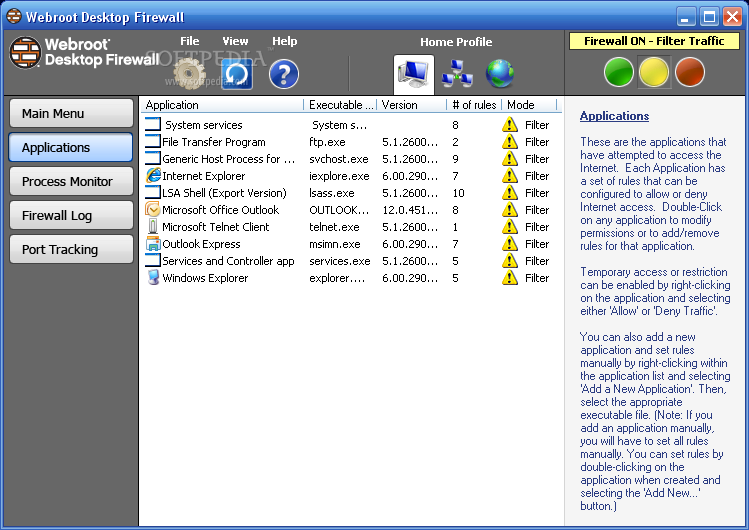
Webroot Desktop Firewall

A computer without a firewall is easy prey for hackers, worms, remote access Trojans and other online threats. Anti-spyware and virus protection are only a part of any security solution. A firewall is a critical component, and Webroot Desktop Firewall secures your computer from Internet threats and reduces the risks of being a victim of online crimes. Unlike the Windows XP and Vista Firewall, Webroot Desktop Firewall combines intelligent firewall technology with intrusion prevention for inbound and outbound protection that is both powerful and easy to use.

Designed for novices and experts alike, Webroot Desktop Firewall is the gatekeeper to your PC.
  • Monitors Internet traffic in and out of your PC for better protection.
  • Makes your PC invisible to online scammers looking for easy targets.
  • Prevents remote access Trojans from hijacking your PC and many more features.
License type: Freeware
Operating Systems: Windows XP/Vista
File size: 3.31 MB
Developer: Webroot Software, Inc.

You have to register first online to get the Free Webroot Desktop Firewall.


To register, visit the link below: http://www.webroot.com/forms/wdfformhdlr.php?formname=desktopfirewall

CCleaner : system optimization and privacy tool

CCleaner is a freeware system optimization and privacy tool. It removes unused files from your system - allowing Windows to run faster and freeing up valuable hard disk space. It also cleans traces of your online activities such as your Internet history. But the best part is that it's fast (normally taking less than a second to run) and contains NO Spyware or Adware! :)

Cleans the following

Internet Explorer
Temporary files, URL history, cookies, Autocomplete form history, index.dat.
Firefox
Temporary files, URL history, cookies, download history.
Opera
Temporary files, URL history, cookies.
Windows
Recycle Bin, Recent Documents, Temporary files and Log files.
Registry cleaner
Advanced features to remove unused and old entries, including File Extensions, ActiveX Controls, ClassIDs, ProgIDs, Uninstallers, Shared DLLs, Fonts, Help Files, Application Paths, Icons, Invalid Shortcuts and more... also comes with a comprehensive backup feature.
Third-party applications
Removes temp files and recent file lists (MRUs) from many apps including Media Player, eMule, Kazaa, Google Toolbar, Netscape, MS Office, Nero, Adobe Acrobat, WinRAR, WinAce, WinZip and many more...
100% Spyware FREE
This software does NOT contain any Spyware, Adware or Viruses.


CCleaner - Home

Spybot - Search & Destroy

Spybot - Search & Destroy detects and removes spyware, a relatively new kind of threat not yet covered by common anti-virus applications. Spyware silently tracks your surfing behaviour to create a marketing profile for you that is transmitted without your knowledge to the compilers and sold to advertising companies. If you see new toolbars in your Internet Explorer that you haven't intentionally installed, if your browser crashes inexplicably, or if your home page has been "hijacked" (or changed without your knowledge), your computer is most probably infected with spyware. Even if you don't see the symptoms, your computer may be infected, because more and more spyware is emerging. Spybot-S&D is free, so there's no harm giving it a try to see if something has invaded your computer.

To see a list of threats Spybot-S&D can remove, in the navigation bar at the left click on Support --> Threats. For an introduction to Spybot-S&D, please read the tutorial. If you fear incompatibility with other software you are now using, although we can assure you that there is no danger you can review our compatibility overview which lists some software whose compatibility has been analyzed.

Spybot-S&D can also clean usage tracks, an interesting function if you share your computer with other users and don't want them to see what you have been working on. And for professional users, Spybot-S&D allows you to fix some registry inconsistencies and extended reports. A list of all the application's features is also available.

Spybot - Search & Destroy - The home of Spybot-S&D!