TED Blog: 100 Websites You Should Know and Use

The Web is constantly turning out new and extraordinary services many of us are unfamiliar with.

During TED University at this spring's TED2007 in Monterey, Julius Wiedemann, editor in charge at Taschen GmbH, offered an ultra-fast-moving ride through sites in many different areas, from art, design and illustration, to daily news, blogs and curiosity.

Now, by popular demand, here's his list of 100 websites you should know and use >>

TED Blog: 100 Websites You Should Know and Use

Microsoft To Unveil Free Beta Antimalware Service Tuesday - Security - IT Channel News by CRN

Microsoft (NSDQ:MSFT) is set for the launch of its free antimalware service, Microsoft Security Essentials, which is scheduled to go live in beta on Tuesday.

Altogether, Microsoft Security Essentials, which up until now was code- named Morro, is a free service that will offer comprehensive antimalware to combat viruses, Trojans, Internet worms, botnets and spyware. A full version of the service will be released later this year.

The service will protect users' PCs on XP and Vista and will give an added boost to the impending release of Windows 7, which will be available in October.

The software giant's impending launch of Microsoft Security Essentials comes as the company phases out the last vestiges of its subscription-based consumer antivirus product, Live OneCare, which was a commercial flop. The consumer product, which cost users $49.99 a year to cover three PCs, captured less than 2 percent of the security market share since its launch almost three years ago.

Microsoft announced in November 2008 that it planned to discontinue its Live OneCare product by June 30, replacing it with the release of a free consumer antivirus product during the first half of 2009.

Industry analysts contend that Microsoft Security Essentials will be on par with basic consumer antivirus and antimalware products from security industry competitors Symantec, McAfee and Trend Micro, which cost about $40 retail.

Symantec (NSDQ:SYMC) and McAfee have both downplayed the upcoming release of Microsoft Security Essentials, contending that the free product will likely not provide the breadth and quality of technologies that they offer in their comprehensive security suites and high-end point products, such as application firewalls, data loss prevention, backup and recovery, and encryption technologies. Others speculated that the free product might be nothing more than Microsoft taking another stab at entering the antivirus space with a revamped version of OneCare.

However, Microsoft maintained that the free service would not compete with security vendors but was instead intended for audiences that might not otherwise afford or have access to security software. In particular, Microsoft said that the service would target developing markets such as Brazil and China, which require increased IT security infrastructure but whose residents often lack financial resources to buy and install security software.

Over the last few years, Microsoft has made more inroads into the PC security space, raising tensions as it continued to compete with security giants such as Symantec and McAfee. The software giant was criticized by competitors in 2006 and 2007 for the release of its "secure" operating system Windows Vista, who claimed that Microsoft would deny them access to the heart of the operating system.

However, executives at AVG, a security company with a free antivirus offering, maintained that Microsoft's impending release of Security Essentials would not threaten their core business.

J.R. Smith, AVG CEO, said that AVG generated business by convincing users that they needed more than basic antivirus once they started using the company's free service.

"We realized a long time ago that basic AV is pretty commoditized," Smith said. "We've been making our living by making people understand there's more to it than that."

Smith said that AVG applauded Microsoft's efforts to distribute security software to a broad market, contending that it would raise general awareness about the need for security software, especially when surfing the Web.

"(Microsoft is) moving in parallel with their new operating system and probably focused on netbooks and the lower end of the market, where people do need more protection," Smith said. "They're going to increase awareness, and that's going to be good for all of us."


Microsoft To Unveil Free Beta Antimalware Service Tuesday - Security - IT Channel News by CRN

Coffee

Ah, coffee. I don’t think I’m in the minority when I say that coffee is a staple to my day. Web workers in general crave the bean, and without it the day doesn’t go as well.


There’s something about the smell of a fresh pot of coffee that makes the senses come alive. Many a cup of joe has sustained me through long nights of writing and coding deadlines.


I doubt I would have made many of those deadlines without the aide of our caffeinated friend.

Photo by Chris Owens.
15 Things Every Web Developer Should Be Thankful For

Vail Valley

The Vail Valley Getaway is a dream come true for children. Parents can relax as there are a variety of fun and safe activities offered all over The Vail Valley . People of all ages smile when they go skiing or snowboarding for the first time . Golf, kayaking, rafting, ice skating, hiking, snowshoeing and even sitting in the hot tub are just a handful of the activities to choose from. For beginners, there are always classes or clinics to teach your children a new sport or hobby!

Enjoy live children's shows and activities in Beaver Creek Village and Vail Village during the summer months. And don't miss the magnificent fireworks display at Vail and Beaver Creek both New Year's and Fourth of July. There are also delicious ice cream shops and family-friendly restaurants all over the that are perfect for small parties or multiple families. Just ask an Getaway representative for additional information.

Climate

Enjoy great year-round climate on The Vail Valley. Summers are perfect with no humidity or bugs,. Winters are perfect for skiing but pleasant enough to enjoy winter outdoor activities. Spring and Fall are temperate and gorgeous.


Average High
Temperature
Average Low
Temperature
January
February
March
April
May
June
July
August
September
October
November
December
26
32
38
47
58
70
75
74
66
59
35
26
2
6
14
22
30
34
40
39
32
23
12
4


A Biker's and Hikers Dream

The Vail Valley is perfect for outdoor activities! You will love our Valley that is completely biker nd hiker friendly. Bicycling and hiking is a great way to explore the Valley inside and out. Navigate through miles of beautiful mountain trails.

Shopping and Dining


If you enjoy shopping and dining, The Vail Valley will exceed your expectations! The Vail Valley offers a variety of family owned businesses, boutiques and unique gift shops scattered all over the valley . From upscale shopping boutiques to retro consignment shops and low-key mountain markets there is something for everyone!

Even the most selective palate will be satisfied at one of The Vail Valley's finest restaurants. With over 200 restaurants and every genre of cuisine, visitors can try a different restaurant every night they are here for years to come. Whatever you have a taste for or whatever your budget allows, there will be a list of fabulous The Vail Valley restaurants and bars that will satisfy your craving. From family-friendly, totally casual, romantic, or an outdoor setting, experience restaurants you will love!

All vail vacation rentals and beaver creek vacation rentals are fully furnished and completely equipped with items to make your stay as comfortable as possible. You will see why renting a privately-owned home or villa has so many advantages over staying in a hotel. Our private, safe and convenient vail rentals are much more cost-effective than a fully-furnished hotel.

Tectonic » Sun plugin gives MS Office users ODF support

ODFOne of the complaints against Microsoft has been that it doesn’t support the Open Document Format (ODF) with its Microsoft Office suite. And now that ODF is a ratified OSI standard (while Microsoft’s OOXML is still in the OSI process) more and more organisation and governments are looking at ODF as the document standard. For users needing to interact with ODF users but still stuck with Microsoft Office, Sun Microsystems has released an ODF plugin for Microsoft Office.

The plugin works with Microsoft Office 2007 (Service Pack 1 or higher), Microsoft Office 2003, XP and Microsoft Office 2000. The plugin integrates with Office’s Load and Save menu items so saving (or opening) an ODF document is straight forward.

Get the Sun ODF plugin here or simply download OpenOffice.org and avoid the need for a plugin.

http://www.sun.com/software/star/odf_plugin/index.jsp

Tectonic » Sun plugin gives MS Office users ODF support

PDFMoto


PDFMoto automatically converts documents produced in desktop applications such as Word, Excel and Visio into PDF then publishes them to one or multiple web sites. Using the original folder structure as a basis PDFMoto builds entire web sites or specific areas within larger sites. Navigation and linking are automatically created and the look and feel can be matched with your existing designs using a powerful XML template system.

PDFMoto monitors the source document structure, detects documents that have been added, deleted or amended and reflects these changes by automatically updating the site.

Shipped with over 30 different publishing templates, PDFMoto can be used straight out of the box or can be modified for a closer match to your existing look.

Features include full build scheduling, browser based document submission, document management, unlimited web site destinations and support for Meta schemes (ie Dublin Core). Configured in minutes and ideal for large and small organizations.

A fully functional freeware version is available.

PDFMoto

23 Lesser known but Incredibly useful Windows Shortcuts

Lesser Known but useful Windows Keyboard ShortcutsKeyboard Shortcuts are a great way to increase productivity as they save a lot of time and also relieve hands from that pain caused by using mouse repetitively.
Here are 23 lesser known Windows Shortcuts categorized into their area of use that are incredibly helpful in increasing productivity as they make common daily tasks a lot easier.

Windows Explorer

1. F2: Rename object - Forget right clicking a file or folder to find Rename option, Just select any file or folder with a single click and press F2 to rename selected object.
2. F6 - Pressing F6 will let you move across various panes of Windows Explorer.
3. Alt + Enter/ Alt+Double Click: Select any object in Windows Explorer and then use Alt+Enter or Alt+Double Click to open properties of the selected object.
4. SHIFT+right click: Displays right context menu containing alternative commands, e.g. you can get an option to Open Command Window here if you use Shift+right click on any explorer object.
Alternate right context menu
5. SHIFT+double click: Runs the alternate default command (the second item on the right context menu). e.g. You can open Explorer View directly by clicking on any folder with Shift key pressed.

See all 23 here: 23 Lesser known but Incredibly useful Windows Shortcuts

MWSnap


(click to zoom)


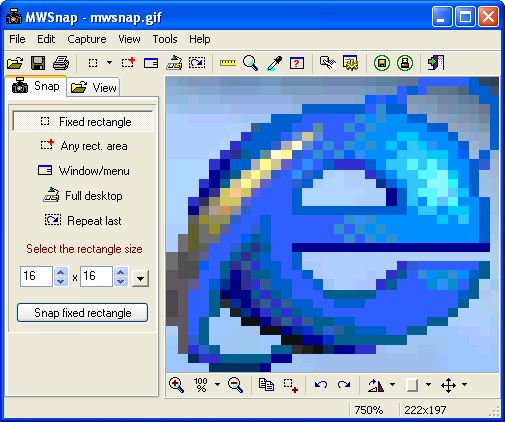
MWSnap is a small yet powerful Windows program for snapping (capturing) images from selected parts of the screen.
Current version is capable of capturing the whole desktop, a highlighted window, an active menu, a control, or a fixed or free rectangular part of the screen. MWSnap handles 5 most popular graphics formats and contains several graphical tools: a zoom, a ruler, a color picker and a window spy. It can be also used as a fast picture viewer or converter.
MWSnap does not require installation and does not need any special dlls, drivers or system files which can mess up your system.
MWSnap is freeware, but your donations are gladly accepted.
Current stable version: 3.00.0.74, 06 Jul 2002
Platform: any 32-bit Windows (including XP)
Download:
v.3.00 as Setup (recommended): site 1, site 2 (643 KB)
v.3.00 as ZIP file: site 1, site 2 (601 KB) Be sure to unpack internal "Lang" subfolder!
Up-to-date languages pack: MWSnapLang.zip (123 KB, 16 Mar 2003)

Mirek's Free Windows Software

The Free GOOD Software List

If you want software that works, doesn't cost an arm and a leg, contains no spyware and just plain doesn't suck - you're at the right place. 
If you don't see a program listed here, it is probably not a good idea to download it. However if you know of a good piece of software that's not listed, please let me know so I can test it. If it passes all the testing, it will be added.
I am always updating and testing free software. I will not add something here unless I approve of it. None of these carry ANY - spyware, ad-ware , pop-ups. All "trial" software includes FULL functionality. If your software made it to this list, congratulations. We appreciate your work.

If you know where to look - there is no reason to "buy" software. Please donate to the makers of the software if you use it.

Ramsinks

Gmail Tips - The Complete Collection

Here you will find all the Gmail Tips posted to GmailTips.com. I hope they help you in your continued use of Gmail!

Note that his is an archive of Tips and articles written since May, 2004. As such, specific features, issues, and opinions many have since been changed, updated, or corrected. In the near future, I will try to indicate on each affected article or Tip where changes may have occurred, and where later Tips preempt previous Tips. Until then, just sit back and enjoy the read!

Gmail Tips - The Complete Collection